MCP (Model Context Protocol) Explained: How to Connect AI to Your Development Tools
Learn how MCP (Model Context Protocol) by Anthropic works. Understand the architecture, Resources/Tools/Prompts primitives, the growing ecosystem, and practical examples to connect AI to your development tools.
MCP (Model Context Protocol) Explained: How to Connect AI to Your Development Tools
Every developer who has worked with AI tools has hit the same wall: the model is powerful, but it cannot access your specific tools, databases, or internal systems. You end up copying and pasting context, writing custom API wrappers, or building fragile integrations that break with every update.
The Model Context Protocol (MCP), developed by Anthropic and released as an open standard, solves this problem. It is a universal protocol that lets AI applications connect to any data source or tool through a standardized interface—no custom integrations required.
This guide explains everything you need to know about MCP: what it is, how it works, what you can build with it, and why it matters for the future of AI-powered development.
What Is MCP?
The USB Analogy
The simplest way to understand MCP is through an analogy. Before USB, every hardware peripheral needed its own proprietary connector. Printers, keyboards, mice, and cameras all required different ports, cables, and drivers. USB created a universal standard, and the hardware ecosystem exploded.
MCP does the same thing for AI integrations. Before MCP, connecting an AI model to your tools required custom code for each combination of model and tool. MCP provides a universal protocol so that any AI application can connect to any tool through a single standard.
Formal Definition
MCP (Model Context Protocol) is an open protocol that standardizes how AI applications communicate with external data sources and tools. It defines:
- How clients (AI applications) discover available capabilities
- How servers (tools and data sources) expose their functionality
- How data flows between them securely and efficiently
Why Anthropic Built MCP
Anthropic recognized that AI models, no matter how capable, are only as useful as the context they can access. Building custom integrations for every tool is unsustainable. MCP was created to solve the N x M problem: instead of building N integrations for M tools, you build one MCP client and one MCP server, and everything connects.
MCP Architecture: How It Works
Core Components
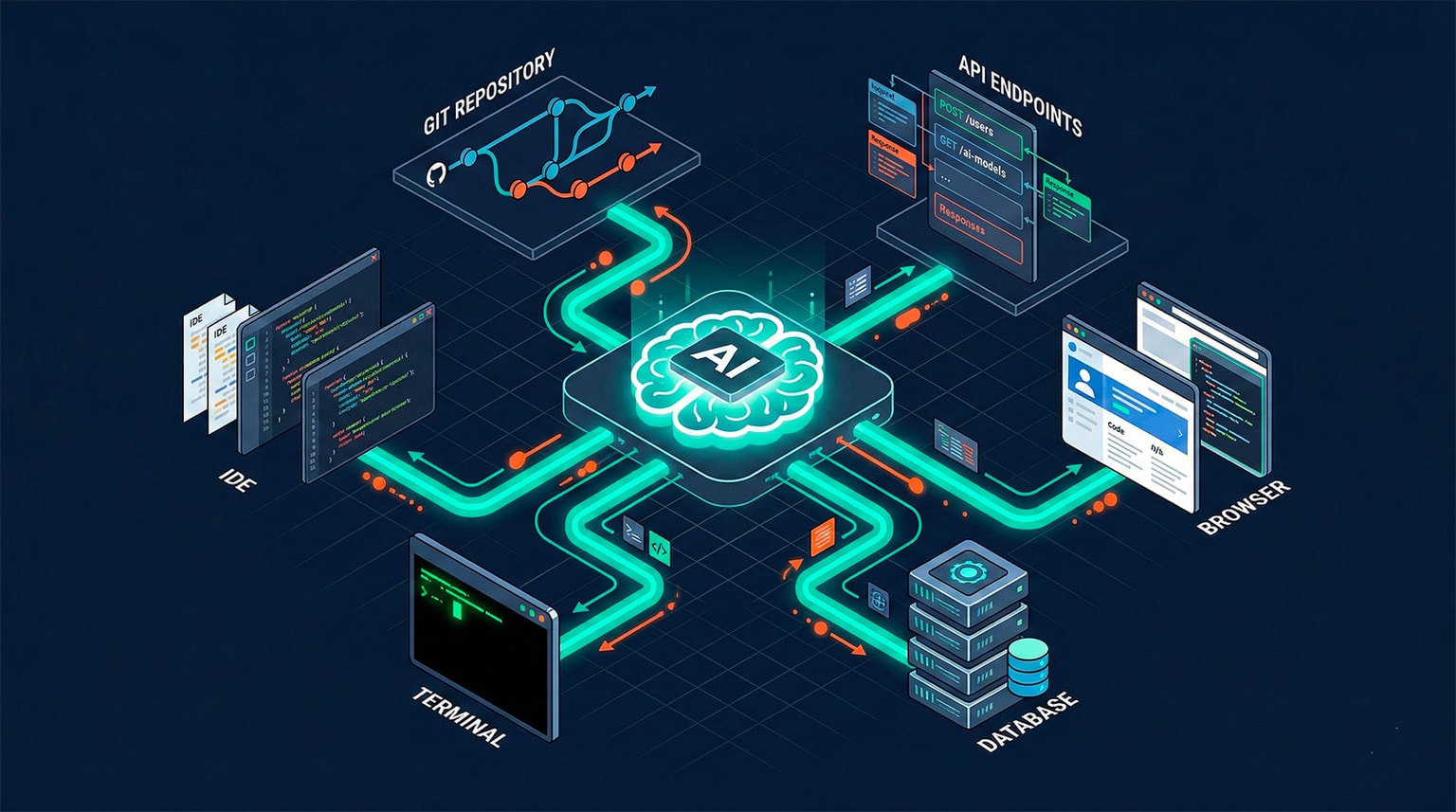
MCP follows a client-server architecture with three main components:
┌─────────────────┐     ┌─────────────────┐     ┌─────────────────┐
│   MCP Host      │     │   MCP Client    │     │   MCP Server    │
│  (AI App)       │────▶│  (Connector)    │────▶│  (Tool/Data)    │
│  Claude Desktop │     │  Built into     │     │  Database,      │
│  Cursor, IDE    │     │  the host       │     │  API, File      │
└─────────────────┘     └─────────────────┘     └─────────────────┘
MCP Host: The AI application the user interacts with (Claude Desktop, Cursor, Claude Code, etc.)
MCP Client: A connector built into the host that manages the protocol communication. Each client maintains a 1:1 connection with a server.
MCP Server: A lightweight program that exposes specific tools or data sources through the MCP protocol. Servers can be local processes or remote services.
Transport Mechanisms
MCP supports two primary transport mechanisms:
1. Stdio (Standard Input/Output) Used for local servers running on the same machine. The host spawns the server as a child process and communicates through stdin/stdout.
{
  "mcpServers": {
    "filesystem": {
      "command": "npx",
      "args": [
        "-y",
        "@modelcontextprotocol/server-filesystem",
        "/path/to/directory"
      ]
    }
  }
}
2. SSE (Server-Sent Events) over HTTP Used for remote servers. The client connects to the server over HTTP, enabling cloud-hosted MCP servers.
{
  "mcpServers": {
    "remote-db": {
      "url": "https://mcp.example.com/database",
      "headers": {
        "Authorization": "Bearer token"
      }
    }
  }
}
The Connection Lifecycle
- Initialization: Host starts the server and sends a capability handshake
- Discovery: Client queries the server for available resources, tools, and prompts
- Operation: Client sends requests; server processes and returns results
- Shutdown: Host gracefully terminates the connection
The Three MCP Primitives
MCP exposes three core primitives that servers can implement. Understanding these is key to understanding the protocol.
1. Resources
Resources provide data and context to the AI model. They are read-only and represent things like files, database records, API responses, or any structured data.
Example: A database MCP server might expose table schemas and query results as resources.
server.resource("schema://users", async () => {
  const schema = await db.getSchema("users");
  return {
    contents: [
      {
        uri: "schema://users",
        mimeType: "application/json",
        text: JSON.stringify(schema, null, 2),
      },
    ],
  };
});
Use cases:
- File contents from a repository
- Database schemas and records
- API documentation
- Configuration files
- Log files and monitoring data
2. Tools
Tools are executable functions that the AI model can invoke to perform actions. Unlike resources, tools actively do things—they can write to databases, call APIs, execute commands, or modify files.
Example: A GitHub MCP server might expose tools for creating issues, submitting PRs, and running workflows.
server.tool(
  "create-issue",
  "Create a GitHub issue",
  {
    title: z.string().describe("Issue title"),
    body: z.string().describe("Issue body in markdown"),
    labels: z.array(z.string()).optional(),
  },
  async ({ title, body, labels }) => {
    const issue = await github.createIssue({ title, body, labels });
    return {
      content: [
        {
          type: "text",
          text: `Created issue #${issue.number}: ${issue.html_url}`,
        },
      ],
    };
  },
);
Use cases:
- CRUD operations on databases
- Git operations (commit, push, create PR)
- API calls to external services
- File system modifications
- Running tests or build commands
- Sending messages (Slack, email)
3. Prompts
Prompts are pre-defined templates that help users interact with the server's capabilities effectively. They provide structured ways to invoke common workflows.
Example: A code review MCP server might expose a prompt template for reviewing a pull request.
server.prompt(
  "review-pr",
  "Review a pull request for code quality, security, and best practices",
  {
    pr_number: z.string().describe("Pull request number"),
  },
  async ({ pr_number }) => {
    const diff = await github.getPRDiff(pr_number);
    return {
      messages: [
        {
          role: "user",
          content: {
            type: "text",
            text: `Review this pull request diff for code quality, security vulnerabilities, and best practices:\n\n${diff}`,
          },
        },
      ],
    };
  },
);
Use cases:
- Code review templates
- Data analysis workflows
- Report generation
- Debugging procedures
- Onboarding checklists
How the Primitives Work Together
In practice, a single MCP server often combines all three primitives:
| Primitive | Role | Control | Example |
|---|---|---|---|
| Resources | Provide context | Application-controlled | Load file contents into context |
| Tools | Execute actions | Model-controlled (with approval) | Create a database record |
| Prompts | Structure interaction | User-controlled | Start a code review workflow |
The MCP Ecosystem in 2026
Official Reference Servers
Anthropic maintains a set of official reference servers that demonstrate best practices:
| Server | Description | Transport |
|---|---|---|
| Filesystem | Read/write local files | Stdio |
| GitHub | Issues, PRs, repos, code search | Stdio |
| GitLab | Similar to GitHub server | Stdio |
| PostgreSQL | Query databases, inspect schemas | Stdio |
| SQLite | Lightweight database access | Stdio |
| Slack | Send messages, read channels | Stdio |
| Google Drive | Access and search documents | Stdio |
| Puppeteer | Browser automation, screenshots | Stdio |
| Brave Search | Web search capabilities | Stdio |
| Memory | Persistent knowledge graph | Stdio |
Community Ecosystem
The MCP community has exploded. As of early 2026, there are hundreds of community-built servers covering nearly every developer tool imaginable:
Databases and Data:
- MongoDB, MySQL, Redis, Elasticsearch
- Snowflake, BigQuery, Supabase
- Pinecone, Weaviate (vector databases)
Development Tools:
- Docker, Kubernetes, Terraform
- Jenkins, CircleCI, GitHub Actions
- Sentry, Datadog, PagerDuty
Communication:
- Linear, Jira, Asana
- Discord, Microsoft Teams
- Notion, Confluence
Cloud Providers:
- AWS (S3, Lambda, CloudWatch)
- Google Cloud, Azure
- Vercel, Netlify, Cloudflare
Which AI Tools Support MCP?
MCP adoption has grown rapidly across the AI tooling landscape:
| Tool | MCP Support | Notes |
|---|---|---|
| Claude Desktop | Full | Native MCP client |
| Claude Code | Full | Terminal-based MCP support |
| Cursor | Full | Integrated in settings |
| Windsurf | Full | Built-in MCP panel |
| Cline | Full | VS Code extension |
| Continue | Full | Open-source VS Code/JetBrains |
| Zed | Full | Built into the editor |
| GitHub Copilot | Partial | Growing support |
| ChatGPT | Announced | OpenAI adopting MCP |
Practical Examples: Building with MCP
Example 1: Connecting Claude Code to Your Database
One of the most powerful MCP use cases is giving your AI assistant direct access to your database. Instead of copying schema information or query results into the chat, the model can query the database directly.
Setup (in Claude Desktop config or Claude Code):
{
  "mcpServers": {
    "postgres": {
      "command": "npx",
      "args": [
        "-y",
        "@modelcontextprotocol/server-postgres",
        "postgresql://user:password@localhost:5432/mydb"
      ]
    }
  }
}
What you can then do:
- Ask Claude to analyze your database schema
- Have it write and execute SQL queries
- Request data analysis and reporting
- Generate migration scripts based on current schema
- Debug data-related issues directly
Example 2: Building a Custom MCP Server for Your Internal API
If your team has an internal API, you can wrap it in an MCP server so that any AI tool can interact with it.
import { McpServer } from "@modelcontextprotocol/sdk/server/mcp.js";
import { StdioServerTransport } from "@modelcontextprotocol/sdk/server/stdio.js";
import { z } from "zod";

const server = new McpServer({
  name: "internal-api",
  version: "1.0.0",
});

// Expose a resource: list of services
server.resource("services://list", async () => {
  const services = await fetch("https://api.internal.com/services").then((r) =>
    r.json(),
  );
  return {
    contents: [
      {
        uri: "services://list",
        mimeType: "application/json",
        text: JSON.stringify(services, null, 2),
      },
    ],
  };
});

// Expose a tool: deploy a service
server.tool(
  "deploy-service",
  "Deploy a service to the specified environment",
  {
    service: z.string().describe("Service name"),
    environment: z.enum(["staging", "production"]),
    version: z.string().describe("Version tag to deploy"),
  },
  async ({ service, environment, version }) => {
    const result = await fetch("https://api.internal.com/deploy", {
      method: "POST",
      body: JSON.stringify({ service, environment, version }),
    }).then((r) => r.json());

    return {
      content: [
        {
          type: "text",
          text: `Deployed ${service}@${version} to ${environment}. Status: ${result.status}`,
        },
      ],
    };
  },
);

// Start the server
const transport = new StdioServerTransport();
await server.connect(transport);
This server can now be used by Claude Desktop, Cursor, Claude Code, or any MCP-compatible client—instantly giving your AI assistant access to your internal deployment pipeline.
Example 3: Multi-Server Workflow
The real power of MCP emerges when you connect multiple servers simultaneously. Here is a realistic developer workflow:
Configured servers:
- GitHub (for code and issues)
- PostgreSQL (for database access)
- Slack (for team communication)
- Sentry (for error monitoring)
Workflow: "Investigate the spike in 500 errors reported in Sentry, find the root cause in the code, fix it, and notify the team."
The AI can:
- Query Sentry for recent error details via the Sentry MCP server
- Search the codebase on GitHub for the relevant file
- Check the database for related data anomalies
- Create a fix and open a pull request
- Send a Slack message to the team with a summary
All through standardized MCP connections, without any custom glue code.
MCP vs Alternatives
MCP vs Function Calling
| Aspect | Function Calling | MCP |
|---|---|---|
| Scope | Per-API-call tool definitions | Protocol-level standard |
| Discovery | Manual definition required | Automatic capability discovery |
| Reusability | Tied to one integration | Works across all MCP clients |
| Ecosystem | Custom per provider | Shared ecosystem of servers |
| Standardization | Vendor-specific | Open standard |
MCP vs LangChain/LlamaIndex Tool Integrations
| Aspect | LangChain/LlamaIndex | MCP |
|---|---|---|
| Architecture | Library-level abstraction | Protocol-level standard |
| Language | Python-centric | Language-agnostic |
| Client coupling | Tightly coupled to framework | Works with any MCP client |
| Deployment | Embedded in application | Standalone servers |
| Interoperability | Limited to one framework | Universal across AI tools |
MCP vs Custom API Wrappers
| Aspect | Custom Wrappers | MCP |
|---|---|---|
| Development time | Hours to days per integration | Minutes with SDK |
| Maintenance | Custom per tool | Standardized protocol |
| Reusability | Usually project-specific | Shared across all AI tools |
| Discovery | Hard-coded | Dynamic capability discovery |
| Security | Custom implementation | Built-in permission model |
Security Considerations
The Permission Model
MCP includes a built-in permission model that gives users control over what AI models can access:
- Resource access: Users approve which data sources the model can read
- Tool execution: Users confirm before tools perform actions (especially destructive ones)
- Scope limitation: Servers can restrict which operations are available
- Authentication: Servers can require credentials and validate permissions
Best Practices for MCP Security
- Principle of least privilege: Only expose the capabilities your AI needs
- Read-only by default: Start with resources before adding write-capable tools
- Credential management: Never hard-code secrets in MCP server configs; use environment variables
- Audit logging: Log all tool invocations for review
- Sandboxing: Run MCP servers in isolated environments for sensitive operations
- Input validation: Validate all inputs with schemas (Zod, JSON Schema)
Getting Started with MCP
Step 1: Set Up a Client
If you use Claude Desktop, Cursor, or Claude Code, MCP support is already built in. Configuration typically involves editing a JSON config file.
Claude Desktop (macOS):
# Edit the config file
code ~/Library/Application\ Support/Claude/claude_desktop_config.json
Claude Code:
# Add an MCP server
claude mcp add my-server npx -y @modelcontextprotocol/server-filesystem /path/to/dir
Step 2: Connect a Reference Server
Start with one of the official servers to understand the workflow :
{
  "mcpServers": {
    "filesystem": {
      "command": "npx",
      "args": [
        "-y",
        "@modelcontextprotocol/server-filesystem",
        "/Users/you/projects"
      ]
    }
  }
}
Step 3: Build Your Own Server
Use the TypeScript or Python SDK to create a custom server:
# TypeScript
npm init -y
npm install @modelcontextprotocol/sdk zod

# Python
pip install mcp
Step 4: Share with Your Team
MCP servers are lightweight and portable. Share them as npm packages, Docker containers, or Git repositories so your entire team benefits from the same AI tool integrations.
The Future of MCP
What Is Coming Next
- Streamable HTTP transport: Replacing SSE with a more efficient transport for remote servers
- OAuth 2.0 integration: Standardized authentication for remote MCP servers
- Agent-to-agent communication: MCP as the protocol for multi-agent systems
- Registry and marketplace: A centralized directory for discovering MCP servers
- Richer media types: Support for images, audio, and video in MCP responses
- Caching and performance: Built-in caching layers for expensive operations
Why MCP Matters Long-Term
MCP is becoming the TCP/IP of AI integrations. Just as HTTP standardized how web clients and servers communicate, MCP is standardizing how AI models interact with the world. The protocol is open, the ecosystem is growing, and major AI companies (including OpenAI) are adopting it.
For developers, this means:
- Build one MCP server, and it works everywhere
- A growing library of pre-built integrations
- Reduced vendor lock-in across AI tools
- A clear standard for AI-powered automation
Frequently Asked Questions
What is the Model Context Protocol (MCP)?
MCP is an open protocol developed by Anthropic that provides a standardized way for AI models to connect to external data sources and tools. It acts as a universal adapter between AI applications and the services they need to access, similar to how USB standardized hardware connections.
How does MCP differ from function calling or tool use?
Function calling is a model-specific feature where you define tools inline with each API call. MCP is a protocol-level standard that lets any AI application discover and use tools from any MCP server, enabling interoperability across models and applications without rewriting integrations.
Can I build my own MCP server?
Yes. MCP provides SDKs for TypeScript and Python that make it straightforward to build custom servers. A basic MCP server can be created in under 100 lines of code, exposing your internal tools and data sources to any MCP-compatible AI client.
Which AI tools support MCP?
As of 2026, MCP is supported by Claude Desktop, Claude Code, Cursor, Windsurf, Cline, Continue, Zed, and many other AI tools. The ecosystem is growing rapidly with hundreds of community-built MCP servers available.
Is MCP secure for production use?
MCP includes built-in permission models, user-controlled tool approval, and supports authentication. However, like any protocol, security depends on implementation. Follow best practices: use least privilege, validate inputs, audit tool usage, and keep credentials out of config files.
Is MCP only for Anthropic products?
No. MCP is an open protocol released under a permissive license. Any AI tool can implement MCP support, and many already have—including Cursor, Windsurf, Cline, and even OpenAI has announced MCP adoption for ChatGPT.
Conclusion
MCP is one of those rare standards that arrives at exactly the right moment. As AI tools become essential to developer workflows, the need for standardized integrations becomes critical. MCP fills that gap elegantly, providing a simple, powerful, and open protocol for connecting AI to everything.
Whether you are building a custom internal tool or just want your AI assistant to access your database, MCP makes it possible with minimal effort. The ecosystem is mature enough to be useful today and growing fast enough to be essential tomorrow.
Streamline Your AI Workflow with Idlen
Building MCP servers, running AI agents, and managing API costs adds up fast. Idlen helps developers offset these costs by generating passive revenue from their machines during idle time. While your MCP servers are waiting for requests, Idlen puts your resources to work.
Related Articles
- AI Agents for Developers: Complete Guide to Autonomous Tools in 2026 — Explore AI agents that use MCP
- Claude Code vs Copilot Workspace vs Cursor Composer — Compare AI IDEs with MCP support
- Best AI Coding Assistants in 2026 — Complete coding tools comparison
- 15 AI Tools That Actually Improve Developer Workflow — Tools that connect via MCP
- Passive Income Ideas for Developers in 2026 — Monetize your dev workflow with Idlen
Earn passive income while you code
Install Idlen and earn money from your idle browser time. Zero extra work, 100% privacy.