No-Code vs Vibe Coding vs Classic Development: The Decision Guide for Startups
No-code (Bubble, Webflow), vibe coding (Lovable, Bolt, Cursor), or classic development? A practical decision guide for startup founders comparing cost, speed, scalability, and long-term viability.
No-Code vs Vibe Coding vs Classic Development: The Decision Guide for Startups
You have a startup idea. You have validated the problem. Now comes the question that can make or break your first year: how do you build it?
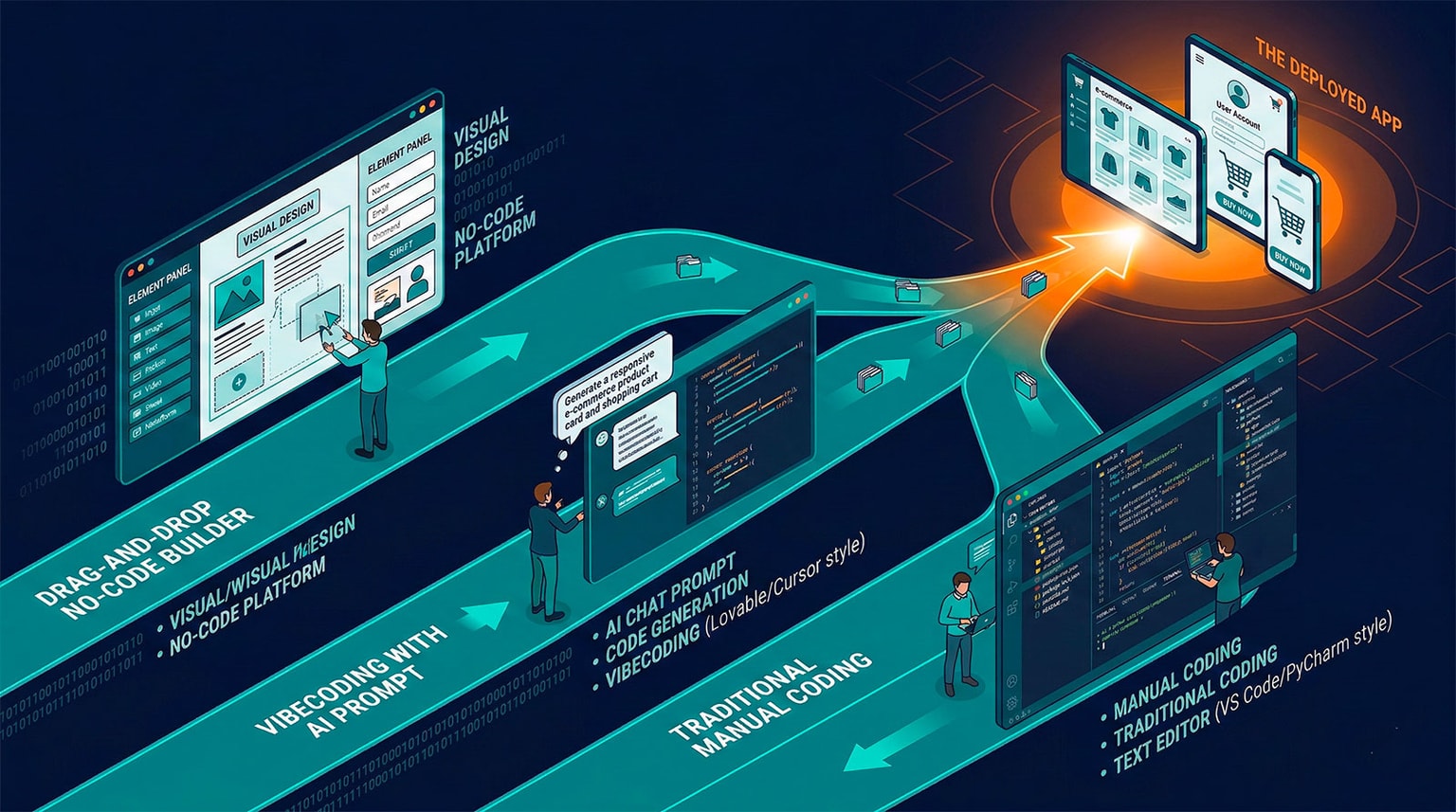
In 2026, amid tech trends transforming the development landscape, founders have three fundamentally different approaches:
- No-code: Drag-and-drop visual builders like Bubble, Webflow, and Glide
- Vibe coding: AI-powered code generation using tools like Lovable, Bolt, and Cursor
- Classic development: Hiring developers or coding it yourself with traditional tools
Each approach has passionate advocates. Each has real trade-offs. And the wrong choice can cost you months of work and thousands of dollars.
This guide gives you a structured framework to make the right decision based on your specific situation -- your budget, your timeline, your technical skills, and the kind of product you are building.
The Three Approaches at a Glance
No-Code: Visual Building Blocks
What it is: You build applications by dragging and dropping pre-built components, configuring workflows through visual menus, and connecting services through plug-in integrations. You never see or write code.
Key platforms:
| Platform | Best For | Pricing |
|---|---|---|
| Bubble | Web apps with databases and user auth | Free - $349/month |
| Webflow | Marketing sites and CMS-driven sites | Free - $49/month |
| Glide | Mobile-friendly apps from spreadsheets | Free - $99/month |
| Adalo | Native mobile apps | Free - $65/month |
| Softr | Internal tools and client portals | Free - $167/month |
| Airtable | Database-driven workflows | Free - $20/user/month |
| Zapier | Automation between tools | Free - $69/month |
How it works in practice: To build a marketplace in Bubble, you create data types (Users, Listings, Orders) through a visual editor, design pages by placing elements on a canvas, and configure workflows ("When button is clicked, create a new Order, send email to seller, redirect to confirmation page") through dropdown menus.
Vibe Coding: AI Writes the Code
What it is: You describe what you want to build in natural language, and AI generates real, production-quality source code. You iterate through conversation, refining the output until it matches your vision. The result is a standard codebase (React, TypeScript, Python) that you fully own.
Key tools:
| Tool | Best For | Pricing |
|---|---|---|
| Lovable | Full-stack web apps from descriptions | $20/month |
| Bolt | Quick web app prototyping | $20/month |
| v0 | UI component generation | Free - $20/month |
| Cursor | AI-native IDE for developers | Free - $20/month |
| Claude Code | CLI-based coding with deep context | $20/month (Pro) |
| Windsurf | AI IDE with codebase understanding | $15/month |
How it works in practice: To build a marketplace in Lovable, you type: "Create a two-sided marketplace where sellers can list products with images and prices, buyers can browse and purchase, with Stripe checkout and email notifications." Lovable generates a complete Next.js application with Supabase backend, authentication, and payment integration. You refine through follow-up prompts: "Add a review system" or "Make the search bar filter by category."
For a deeper understanding of vibe coding, see our complete guide to vibe coding.
Classic Development: Traditional Engineering
What it is: Professional developers write code manually using programming languages, frameworks, and tools. They architect the system, implement features, write tests, and deploy to infrastructure they manage.
Common tech stacks:
| Stack | Best For | Typical Team Size |
|---|---|---|
| Next.js + Supabase | SaaS products, web apps | 1-3 developers |
| React + Node.js + PostgreSQL | Custom web applications | 2-5 developers |
| Django + React | Data-heavy applications | 2-4 developers |
| Rails + Hotwire | Rapid MVPs with full control | 1-3 developers |
| Flutter/React Native | Cross-platform mobile apps | 2-4 developers |
How it works in practice: To build a marketplace, a developer team spends 2-4 weeks on architecture and setup, 4-8 weeks on core features (auth, listings, search, payments), 2-4 weeks on testing and polish, and ongoing time on maintenance and iteration. The result is a fully custom system built to your exact specifications.
The Complete Comparison
1. Time to MVP
How quickly can you go from idea to a working product that real users can test?
| Approach | Time to MVP | Notes |
|---|---|---|
| No-Code | 1-4 weeks | Fastest for standard app types |
| Vibe Coding | 1-3 weeks | Fast for most web apps; depends on complexity |
| Classic Dev | 6-16 weeks | Slowest, but most customizable from day one |
No-code excels when your idea fits neatly into a platform's strengths. A simple marketplace, directory, or internal tool can be live in days. But if you need anything outside the platform's templates, you hit walls quickly.
Vibe coding offers a remarkable middle ground. You can have a working prototype in a single day and a polished MVP in 1-3 weeks. The key advantage over no-code: when you need something custom, you can describe it in natural language rather than fighting against platform limitations.
Classic development is slowest for the initial MVP but offers the most architectural control. If your product requires complex real-time features, custom algorithms, or deep third-party integrations, this may be the only viable path.
Verdict: For validation speed, vibe coding wins. You get the speed of no-code with the flexibility of real code.
2. Total Cost: Year One
The real cost is not just tools. It includes your time, potential hiring, and platform fees.
| Cost Category | No-Code | Vibe Coding | Classic Dev (Freelance) | Classic Dev (Hire) |
|---|---|---|---|---|
| Tool/Platform fees | $100-400/month | $40-100/month | $0-50/month | $0-50/month |
| Hosting | Included | $0-50/month | $20-200/month | $20-200/month |
| Development cost | Your time | Your time | $5,000-50,000 | $8,000-15,000/month |
| Year 1 total (solo founder) | $1,200-5,000 | $500-2,000 | N/A | N/A |
| Year 1 total (with help) | $3,000-10,000 | $2,000-8,000 | $15,000-60,000 | $100,000-200,000 |
Hidden costs to consider:
- No-code: Platform price increases, premium plugins ($10-100/month each), consultant fees when you get stuck ($50-150/hour)
- Vibe coding: AI subscription costs, hosting (Vercel/Railway), potential developer help for complex features
- Classic dev: Recruitment costs, management overhead, onboarding time, developer tools and subscriptions
Verdict: Vibe coding offers the best cost-to-value ratio. No-code looks cheap until you factor in platform scaling costs. Classic development is an order of magnitude more expensive but appropriate when the product demands it.
3. Scalability
What happens when your product succeeds and usage grows?
| Scaling Dimension | No-Code | Vibe Coding | Classic Dev |
|---|---|---|---|
| Users (1-100) | Excellent | Excellent | Excellent |
| Users (100-1,000) | Good | Excellent | Excellent |
| Users (1,000-10,000) | Challenging | Good | Excellent |
| Users (10,000-100,000) | Very difficult | Good (with optimization) | Excellent |
| Users (100,000+) | Not viable | Requires dev expertise | Excellent |
| Database complexity | Limited | Good | Unlimited |
| Custom integrations | Limited to connectors | API-level freedom | Unlimited |
| Performance tuning | Minimal control | Full control | Full control |
No-code scaling issues:
- Bubble apps become noticeably slow above 5,000-10,000 users
- Database queries are not optimizable (you use what the platform provides)
- Costs scale linearly with usage (more users = higher platform tier)
- Some platforms impose hard limits on records, API calls, or storage
Vibe coding scaling considerations:
- The generated code uses standard frameworks (Next.js, React) that scale well
- You may need to optimize database queries and add caching as you grow
- A developer can audit and improve the AI-generated code
- Hosting costs scale predictably on platforms like Vercel or AWS
Classic development advantages:
- Full architectural control from day one
- Can optimize every query, every cache, every API call
- Can choose the perfect database, hosting, and CDN for your needs
- Horizontal scaling patterns (microservices, distributed systems) are available
Verdict: If you plan to scale beyond 10,000 users, classic development provides the most control. Vibe coding is a strong middle ground that scales to tens of thousands of users with modest developer intervention.
4. Code Ownership and Portability
Can you take your product and move it elsewhere?
| Aspect | No-Code | Vibe Coding | Classic Dev |
|---|---|---|---|
| Own the code | No | Yes | Yes |
| Export to GitHub | No (usually) | Yes | Yes |
| Switch hosting | No (platform lock-in) | Yes (any host) | Yes (any host) |
| Hire a dev to modify | Very difficult | Easy | Easy |
| Sell the product | Complex (buyer needs the platform) | Standard asset sale | Standard asset sale |
This is one of the most critical differences for founders.
No-code lock-in is real. If you build your product on Bubble and later decide to switch, you are starting over. Your Bubble app cannot be exported as code. Your database schema, workflows, and UI are all trapped inside the platform. If Bubble raises prices, shuts down, or degrades in quality, you have no escape hatch without a rebuild.
Vibe coding generates portable code. Lovable generates Next.js and Supabase. Bolt generates standard React. You can push the code to GitHub, hire a developer to modify it, or deploy it anywhere. If the vibe coding tool disappears, your code still works.
Classic development gives you the same portability with the added benefit of having been designed by a developer who made intentional architectural choices.
Verdict: Vibe coding and classic development both give you code ownership. No-code does not. If long-term ownership matters (and for a startup, it should), avoid no-code for your core product.
5. Flexibility and Customization
How far can you push each approach before hitting its limits?
What no-code cannot do (or does poorly):
- Complex, multi-step business logic with conditional branching
- Real-time collaboration features (like Google Docs or Figma)
- Custom AI/ML integrations beyond simple API calls
- Offline functionality
- Advanced animations and micro-interactions
- Custom payment flows or complex subscription logic
- Multi-tenant architectures
What vibe coding handles well:
- Custom UI components and animations
- API integrations with any service
- Database operations with complex queries
- Authentication and authorization flows
- AI feature integration (chatbots, search, recommendations)
- Standard e-commerce and SaaS patterns
Where vibe coding may need developer help:
- Complex real-time systems (WebSockets, CRDT-based collaboration)
- High-performance data processing pipelines
- Custom cryptographic or security implementations
- Highly optimized mobile applications
- Distributed systems and microservice architectures
What classic development can do: Everything. The only limit is time, budget, and the team's skill level.
Verdict: No-code is limited to what the platform offers. Vibe coding covers 80% of startup needs. Classic development covers 100% but at higher cost and slower speed.
6. Maintenance and Technical Debt
What happens after launch? Every approach creates different maintenance challenges.
No-code maintenance:
- Platform updates can break your workflows without warning
- Plugin dependencies create fragile systems
- No version control or rollback capabilities in most platforms
- Debugging is limited to the platform's tools
- As complexity grows, visual workflows become unmanageable ("spaghetti flows")
Vibe coding maintenance:
- Code is in Git, so you have full version control and rollback
- AI-generated code may have inconsistent patterns across different generation sessions
- Dependencies and packages need regular updates
- You can use AI to help maintain and update the codebase
- Code quality varies; some refactoring may be needed over time
Classic development maintenance:
- Professional code with consistent patterns and conventions
- Comprehensive test suites reduce regression risk
- Technical debt is intentional and documented
- Easier to onboard new developers
- Maintenance is a known, predictable cost
Verdict: Classic development creates the most maintainable codebase. Vibe coding is in the middle, producing real code that can be maintained but may need periodic cleanup. No-code creates the most fragile systems long-term.
7. Team Requirements
Who do you need on your team for each approach?
| Role | No-Code | Vibe Coding | Classic Dev |
|---|---|---|---|
| Technical co-founder | Not required | Helpful but not required | Strongly recommended |
| Full-time developer | Not required | Not for MVP | Required |
| Designer | Helpful | Helpful | Important |
| DevOps | Not required | Not required initially | Required at scale |
| Minimum viable team | 1 founder | 1 founder | 1-2 developers |
Verdict: Vibe coding has the lowest team requirements for the broadest range of products. A non-technical founder with good product instincts can build and iterate a real product using vibe coding tools.
The Decision Matrix
Use this matrix to identify the best approach for your specific situation. Score each factor 1-3 (1 = low priority, 3 = high priority) and see which approach aligns.
| Factor | No-Code Wins If... | Vibe Coding Wins If... | Classic Dev Wins If... |
|---|---|---|---|
| Budget | Under $5K and no dev budget | Under $10K with modest tools budget | $50K+ available for development |
| Timeline | Need to launch in < 2 weeks | Need to launch in 1-4 weeks | Can invest 2-4 months |
| Technical skill | Non-technical founder | Non-technical to intermediate | Technical founder or dev team |
| Product complexity | Simple CRUD, directory, CMS | Standard SaaS, marketplace, tool | Complex logic, real-time, AI-native |
| Scale expectations | < 1,000 users | < 50,000 users | 50,000+ users |
| Customization needs | Low (standard patterns) | Medium (custom UI and logic) | High (unique features) |
| Long-term plan | Validate and potentially rebuild | Grow and iterate on same codebase | Build once, scale for years |
| Regulatory needs | None | Moderate | Strict (healthcare, finance) |
Real Startup Scenarios
Scenario 1: Non-Technical Founder, B2B SaaS Idea
Situation: Sarah has a SaaS idea for freelancer invoicing. She has $3,000 in savings, no technical co-founder, and needs to validate the idea before raising money.
Best approach: Vibe coding with Lovable
- Use Lovable to generate a full-stack invoicing app in 2-3 days
- Connect Stripe for payments, Supabase for the database
- Launch to 20 beta users within 2 weeks
- Iterate based on feedback using follow-up prompts
- Total cost: ~$60/month (Lovable + hosting)
- If the idea validates, hire a developer to refine the codebase
Why not no-code? Invoicing requires custom business logic (tax calculations, multi-currency, recurring invoices) that would be painful in Bubble. Plus, Sarah wants to own the code for future fundraising.
Why not classic dev? $3,000 would not cover a freelance developer for more than a few days, and Sarah cannot code.
Scenario 2: Technical Founder, Complex Marketplace
Situation: Marcus is a senior developer building a two-sided marketplace for home services. He has raised a $500K pre-seed round and needs to launch in 3 months with a robust product.
Best approach: Classic development, accelerated with vibe coding
- Use Cursor and Claude to accelerate development by 2-3x
- Build on Next.js + Supabase + Stripe Connect
- Implement real-time booking, provider dashboards, and review systems
- Use Lovable or Bolt for rapid prototyping of UI concepts
- Hire one additional developer with AI expertise
- Total cost: ~$15,000/month (2 developers + tools)
Why not pure vibe coding? The marketplace has complex logic (availability scheduling, geolocation matching, escrow payments) that benefits from deliberate architectural decisions.
Why not no-code? The scale and complexity requirements make no-code platforms unsuitable from the start.
Scenario 3: Marketing Startup, Content-Driven Product
Situation: Aisha runs a marketing agency and wants to launch a content analytics tool. She has basic HTML knowledge, a $500/month budget, and needs something live within 2 weeks.
Best approach: Start with no-code, plan for vibe coding migration
- Build the initial dashboard in Softr connected to Airtable
- Use Zapier to automate data collection from social platforms
- Launch to her existing client base for validation
- If the product gains traction, rebuild in vibe coding for scalability and ownership
- Total cost: ~$150/month
Why no-code first? Aisha's product is a dashboard (Softr's strength), her user base is small (her clients), and she needs to validate before investing more.
Why plan for vibe coding migration? If the product works, she will need custom features and scalability that Softr cannot provide.
The Hybrid Strategy: Start Fast, Scale Smart
The most successful startups in 2026 often use a staged approach:
Stage 1: Validate (Weeks 1-4)
- Build an MVP with vibe coding (Lovable or Bolt)
- Focus on the core value proposition, nothing else — learn how to launch a micro-SaaS and get your first customer in 30 days
- Get 20-50 real users testing the product
- Measure: Do users come back? Do they pay?
Stage 2: Iterate (Months 1-3)
- Continue refining with vibe coding tools
- Use Cursor for more complex modifications
- Add features based on user feedback
- Start thinking about architecture for scale
Stage 3: Professionalize (Months 3-6)
- Hire an AI full-stack developer to audit and refactor the codebase
- Add testing, monitoring, and CI/CD
- Optimize performance bottlenecks
- Implement security hardening
Stage 4: Scale (Months 6+)
- Build a development team
- Transition to classic development practices with AI acceleration
- Invest in infrastructure and DevOps
- Continue using AI tools for productivity but with professional engineering standards
This approach lets you validate cheaply, iterate quickly, and scale professionally without being locked into any single approach.
Common Founder Mistakes
1. Building Too Much Before Validating
The biggest mistake is not which approach you choose -- it is building a full product before talking to customers. Whether you use no-code, vibe coding, or classic development, start with the absolute minimum and validate.
2. Choosing No-Code for the Core Product
No-code is excellent for landing pages, internal tools, and prototypes. It is risky for your core product because of vendor lock-in. If your startup succeeds, you will almost certainly need to migrate off the no-code platform.
3. Over-Engineering with Classic Development
Hiring a development team before you have product-market fit is burning cash. Unless your product IS the technology, validate first with faster approaches.
4. Ignoring Code Quality in Vibe Coding
Just because AI generated the code does not mean it is good code. Periodically review the output, refactor messy patterns, and add tests. Treat AI-generated code with the same scrutiny you would apply to a junior developer's pull request.
5. Not Planning for the Transition
If you start with no-code or vibe coding, have a plan for what happens when you outgrow it. Know your migration path before you need it.
Cost Comparison: Detailed Breakdown
Year 1 Total Cost by Startup Stage
| Stage | No-Code | Vibe Coding | Classic Dev |
|---|---|---|---|
| Pre-seed (solo founder) | $2,000-6,000 | $1,000-3,000 | $20,000-60,000 |
| Seed ($500K raised) | $5,000-15,000 | $3,000-10,000 | $100,000-200,000 |
| Series A ($2M+ raised) | Not recommended | $10,000-30,000 (hybrid) | $200,000-500,000 |
Monthly Recurring Costs at Scale (1,000 users)
| Cost | No-Code | Vibe Coding | Classic Dev |
|---|---|---|---|
| Platform/Hosting | $200-500 | $20-100 | $50-300 |
| Third-party services | $50-200 | $50-200 | $50-200 |
| AI tool subscriptions | $0-50 | $40-100 | $40-100 |
| Developer time | 0 hours | 5-10 hours/month | 40-160 hours/month |
| Total | $250-750 | $200-600 | $4,000-16,000+ |
Earning While You Build with Idlen
Building a startup means watching every dollar. Whether you are coding your MVP in Cursor, iterating in Lovable, or brainstorming with Claude, Idlen lets you earn passive income from the AI tools you are already using:
- Install the Idlen extension on your AI coding tools (Cursor, VS Code, ChatGPT, Claude)
- Earn $40-100/month from non-intrusive, developer-focused ads
- Revenue flows in while you build your product -- zero extra effort
- Use the earnings to cover your tool subscriptions, hosting, or domain costs
When you are bootstrapping, every dollar counts. The $50-100/month from Idlen can cover your entire vibe coding tool stack.
Start earning with Idlen -- fund your startup tools ->
Frequently Asked Questions
Which approach is cheapest for an MVP: no-code, vibe coding, or classic development?
For a simple MVP, no-code is cheapest ($0-200/month in platform fees). Vibe coding costs $20-100/month in tool subscriptions plus hosting. Classic development is most expensive, typically $5,000-50,000+ for freelancers or $8,000-15,000/month for a developer hire. However, vibe coding offers the best cost-to-flexibility ratio for most startups.
Can I start with no-code and switch to classic development later?
Technically yes, but practically it means rebuilding from scratch. No-code platforms generate proprietary code that cannot be exported or migrated. Vibe coding is a better starting point if you anticipate needing custom development later, because it generates real, portable code that any developer can work with.
What is vibe coding and how is it different from no-code?
Vibe coding uses AI to generate real source code from natural language descriptions. You describe what you want, and tools like Lovable, Bolt, or Cursor write the actual code (React, TypeScript, etc.). Unlike no-code, you own the code, can export it to GitHub, and deploy anywhere. No-code uses visual drag-and-drop interfaces and hosts your app on their platform. For a deeper comparison, read our article on vibecoding vs no-code differences.
When should a startup choose classic development over no-code or vibe coding?
Choose classic development when you need complex backend logic, real-time features, regulatory compliance, custom integrations, or expect to scale beyond 10,000 users. Also choose classic dev if your product IS the technology (deep tech, AI/ML products, developer tools) or you have raised funding specifically for product development.
Can a non-technical founder use vibe coding?
Yes. That is one of vibe coding's greatest strengths. Our guide on vibe coding for non-technical founders covers this in depth. Tools like Lovable and Bolt are designed for people who can describe what they want but cannot write code. The AI handles the technical implementation. You will get better results if you understand basic web concepts (databases, APIs, authentication), but it is not required to start.
What happens to my vibe-coded product when I hire developers?
Developers can work with vibe-coded projects because the output is standard code (React, Next.js, TypeScript). They will likely refactor some patterns, add tests, and improve the architecture, but they do not need to start from scratch. Think of it as handing a developer a functional prototype that needs professionalization, rather than a blank slate.
Is no-code dead because of vibe coding?
No. No-code still has a strong role for internal tools, landing pages, simple automations, and non-technical users who need quick solutions. But for startup MVPs that need to grow into real products, vibe coding has replaced no-code as the recommended starting approach for most use cases.
Related Articles
- Vibecoding vs No-Code: What's the Difference? -- Deep dive into the two approaches
- ROI of Vibecoding vs Traditional Development -- The numbers behind the decision
- Create an App in 24h: From Idea to Deployment -- Practical guide using vibe coding
- Vibecoding for Non-Technical Founders -- Getting started without coding skills
- 5 Mistakes to Avoid as a Vibecoding Beginner -- Learn from others' errors
- 10 Best Prompts for Lovable, Bolt, and Cursor -- Maximize your vibe coding output
Earn passive income while you code
Install Idlen and earn money from your idle browser time. Zero extra work, 100% privacy.